If you sell digital products, courses, memberships, coaching, or other products online, choosing a shopping cart can become surprisingly complicated.
There are plenty of options out there, but I’ve found that the feature list only tells you part of the story. What happens when you actually start using the software and discover something you need isn’t there?
That’s one of the things that has impressed me most about Zylvie, which I honestly stumbled upon while looking at a different cart solution.
I recently needed a specific feature involving tagging in the autoresponder integration. I contacted the developer and asked about it, figuring it might make its way onto a future update list.
Instead, it was live early the following morning.
That kind of responsiveness gets my attention. And judging from other Zylvie users’ experiences, rapid updates and direct access to the founder appear to be a deliberate part of how the product is being developed. Zylvie’s own site says simple feature requests can sometimes be rolled out within 24 hours, and several customer testimonials describe changes being implemented within hours or days.
So, with that in mind, let’s take a closer look at Zylvie and what it offers.
What is the product?
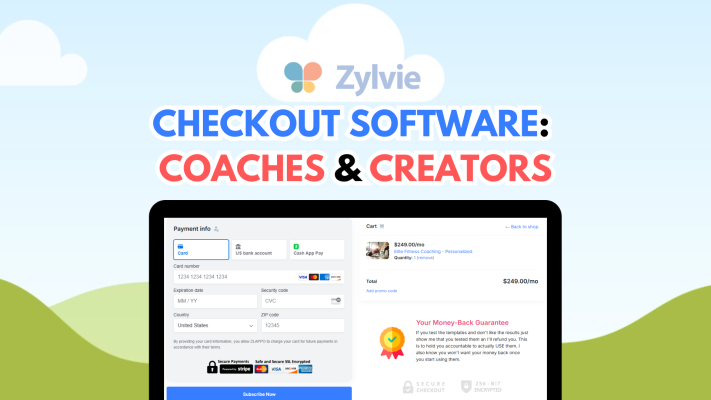
Zylvie is an online shopping cart and sales platform designed primarily for coaches, creators, consultants, and digital entrepreneurs.
Rather than simply giving you a payment button, Zylvie handles much more of the selling process. You can create product and sales pages, accept payments, offer subscriptions, create upsells and order bumps, run an affiliate program, deliver digital products, and integrate buyers with your email marketing system.
One particularly attractive point is that Zylvie charges 0% transaction fees of its own. You can connect Stripe, PayPal, or both, although of course the payment processor itself may still charge its normal processing fees.
You can sell one-time products as well as monthly or annual subscriptions. Zylvie also supports “pay what you want” offers, free lead magnets, pre-orders, multiple pricing tiers, bundles, and multiple stores or brands within a single account.
That last feature could be particularly useful if you’re running several websites or businesses and don’t want to maintain a completely separate shopping cart account for each one.
What does the product do?
Zylvie covers quite a bit of ground, and it would be difficult to mention every feature without turning this review into a manual.
At its core, though, it helps you take someone from interested visitor to paying customer and then automates much of what happens afterward.
You can build sales landing pages using Zylvie’s WYSIWYG editor or keep your existing website and use Zylvie for the cart and checkout portion. Inline and pop-up checkout options are available, so you don’t necessarily have to rebuild your existing sales pages just to use the software.
There are also several features aimed specifically at increasing the amount you make from each customer.
You can add pre-purchase bump offers, create post-purchase one-click upsells and downsells, offer bundles and volume discounts, use promo codes, and run flash sales with countdown timers and quantity counters. Testimonials and other trust elements can also be displayed during checkout.
After somebody buys, Zylvie can handle quite a few fulfillment tasks automatically.
For example, you can send download links, invoices, or customized success emails. Buyers can be redirected to private pages, software sellers can issue unique license keys, and PDF sellers can stamp files with buyer information to discourage unauthorized sharing.
Zylvie also integrates with email marketing services so customers can automatically be added to your mailing lists or sequences. Its sales page currently lists integrations and automation options involving services such as Kit/ConvertKit, MailerLite, AWeber, SendFox, Brevo, GetResponse, Zapier, Pabbly Connect, webhooks, and others.
And this is where my own experience really stood out.
I wanted additional tagging functionality in the autoresponder integration. It wasn’t simply a question about how to use an existing feature. It was something I wanted the integration to do differently.
I sent in the request.
By early the next morning, the feature was live.
That’s pretty remarkable.
Software will almost never have every single feature you want. What matters to me is what happens when you discover one that’s missing. Getting a useful feature added that quickly is something I haven’t experienced very often with software companies.
And apparently I’m not alone. Several testimonials on Zylvie’s own sales page specifically mention founder Jay’s responsiveness and describe feature requests being implemented within a day or two, sometimes even within hours.
Zylvie also publishes a roadmap showing a steady stream of delivered updates. Recent additions listed on the site include automated affiliate payouts in August 2026, an EmailOctopus integration in July 2026, an advanced HTML editor in June, a BirdSend integration in May, and a Drip integration in April.
For me, that’s an important part of evaluating software. You’re not just buying what’s there today. You’re also depending on whoever is behind the product to keep improving it.
Who created the product?
Zylvie is operated by Deep Roots Media, LLC, and the site identifies Jay as the owner/founder in its customer testimonials and discussion of founder support. The company lists Los Angeles, California on the Zylvie website.
Normally, I wouldn’t spend much time discussing the person behind a shopping cart. You generally buy software for what it does, not because you want to know the developer.
With Zylvie, however, I think the developer is actually part of the story.
Zylvie openly positions direct founder access and rapid development as advantages over more established competitors. According to the company, customers can talk directly with the founder, and straightforward feature suggestions may be implemented in as little as 24 hours.
After my tagging request was implemented by early the next morning, that’s not just marketing copy to me. I’ve personally seen how quickly Jay can respond and make a requested improvement.
There’s obviously no guarantee that every feature someone requests will be added overnight. Some changes are going to be considerably more complicated than others, and no developer can reasonably implement every suggestion.
Still, having a developer who actually listens to users is a major plus.
Frequently Asked Questions
What can you sell with Zylvie?
Zylvie is geared toward coaches and creators and can be used for digital products, subscriptions, courses, coaching services, memberships, programs, tickets, and other offers. It supports both one-time and recurring payments.
Does Zylvie charge transaction fees?
Zylvie advertises 0% transaction fees. You’ll still need to take into account the normal fees charged by payment processors such as Stripe or PayPal.
What does Zylvie cost?
As of this post, they have affordable monthly packages starting at $7.99 / month, as well as a couple of lifetime options (which I promptly snagged one up after I was satisfied that it would do everything I needed!)
Can I use my existing website?
Yes. You don’t have to move everything over to Zylvie. You can use your own site and embed Zylvie’s checkout either inline or as a pop-up. Alternatively, you can use Zylvie’s own sales landing pages.
Can Zylvie sell subscriptions?
Yes. Zylvie supports recurring subscriptions, including monthly and annual payments, and it provides subscriber management features. Customers can update payment information, switch plans, or cancel subscriptions through the subscription portal.
Does Zylvie integrate with autoresponders?
Yes. Zylvie has direct integrations with a number of email marketing platforms, along with options such as Zapier, Pabbly Connect, webhooks, and API-based automation. I personally use it directly with my AWeber account.
This is also one area where I’ve personally experienced how responsive the development is. When I requested additional tagging functionality for an autoresponder integration, the change was implemented by early the next morning.
Can I run an affiliate program?
Yes. Zylvie includes a built-in multi-tier affiliate system. You can add affiliates, customize commissions, track referrals, and handle affiliate payouts through the platform.
Can I manage more than one brand?
Yes, and this is one of Zylvie’s more interesting features. A single account can manage multiple independent stores or brands, including different identities, inventories, and custom domains.
Conclusion
There are plenty of shopping carts that can collect money. That’s the easy part.
What makes Zylvie interesting to me is the combination of checkout features, sales tools, integrations, multiple-store support, automated fulfillment, and a development process that seems unusually responsive to its users.
Features such as one-click upsells, bump offers, subscriptions, affiliates, email integrations, custom domains, sales analytics, PDF stamping, and embedded checkout make it capable of handling considerably more than a basic payment page.
But the biggest thing that impressed me wasn’t on a feature comparison chart.
It was the aforementioned feature request that was implemented overnight.
To me, that’s difficult to put a dollar value on.
Of course, Zylvie won’t necessarily be the right cart for every business. Before switching any important sales system, I’d recommend checking the current feature list and integrations against your own requirements. The Roadmap is published right on the homepage.
But if you’re a creator, coach, marketer, or digital product seller looking for a flexible shopping cart, especially if you value having a developer who actually listens and responds to customers, Zylvie is definitely worth taking a closer look at.
Check out Zylvie and its current features.
Affiliate disclosure: This post uses affiliate links. If you purchase from these links, I may receive a small commission at no extra cost to you.

AWeber is my preferred solution for email marketing for 22 years and counting!